
15. Border
Creates borders around an element.
.elemento {
    /*
    border: [size] [style] [color];
    */
    border: 1px solid black;
}
Top border
.elemento {
    /*
    border-top: [size] [style] [color];
    */
    border-top: 1px solid black;
}
Right border
.elemento {
    /*
    border-right: [size] [style] [color];
    */
    border-right: 1px solid black;
}
Bottom border
.elemento {
    /*
    border-bottom: [size] [style] [color];
    */
    border-bottom: 1px solid black;
}
Left border
.elemento {
    /*
    border-left: [size] [style] [color];
    */
    border-left: 1px solid black;
}
width
Border size.
.elemento {
    border-width: 2rem;
}
style
Border style.
.elemento {
    /* Most used */
    border-style: solid;
    border-style: none;

    /* Others */
    border-style: hidden;
    border-style: dotted;
    border-style: dashed;
    border-style: double;
    border-style: groove;
    border-style: ridge;
    border-style: inset;
    border-style: outset;
}
color
Border color.
.elemento {
    border-color: orange;
}
radius
Rounds the corners.
.elemento {
    border-radius: 4rem;
}
If the element is square and has a
border-radius: 50%or greater, you will get a circle.
image
Uses a custom image.
.elemento {
    border: 4rem solid;
    border-image: linear-gradient(#f6b73c, #4d9f0c) 1;
}Activity 1
Starting from the following image:
 * Click on the image to download it
Use borders to trap the monster and achieve the following result.
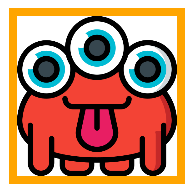
Activity 2
Starting from the image in activity 1, use borders to achieve the following result.
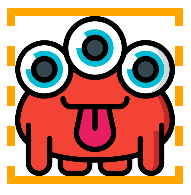
Activity 3
Starting from the image in activity 1, use borders to achieve the following result.
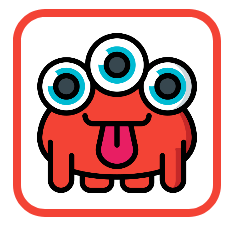
Activity 4
Starting from the image in activity 1, use borders to achieve the following result.
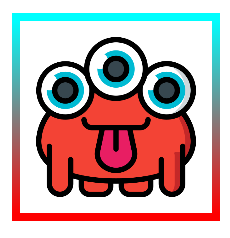
This work is under a Attribution-NonCommercial-NoDerivatives 4.0 International license.
:quality(85)/https://andros.dev/static/img/components/license/by-nc-nd.png)
Desafíos de programación atemporales y multiparadigmáticos
Te encuentras ante un librillo de actividades, divididas en 2 niveles de dificultad. Te enfrentarás a los casos más comunes que te puedes encontrar en pruebas técnicas o aprender conceptos elementales de programación.
Buy the book Sure, it's on me!
Comments
There are no comments yet.