
11. Images
Not only can the width and height of images be defined in HTML, there is also the possibility of using CSS.
img {
    width: 100px;
    height: 200px;
}
Although it is usually more practical to use a width of 100% since it allows images to adapt automatically to all kinds of containers or resolutions.
img {
    width: 100%;
}
And where is the height? It is not necessary since it would deform the image.
aspect-ratio
What would happen if I needed an image to be square no matter its width? For that we must use aspect-ratio.
img {
    aspect-ratio: width / height;
}
It will keep the width and height proportion we configure.
Some example configurations would be the following:
img {
    aspect-ratio: auto; /* Default */
    aspect-ratio: 1 / 1; /* Square */
    aspect-ratio: 16 / 9; /* A horizontal example */
    aspect-ratio: 1; /* Square simplification */
}
object-fit and object-cover
You will have noticed that your images become deformed when you change the aspect ratio between width and height, either through an aspect-ratio or simply using width together with height. Luckily we can fix it with CSS.
We start from the following image of the Golden Gate Bridge in California.

As you can see, it has a vertical proportion (taller than wide, or portrait), but for the design we need it to be horizontal (wider than tall, or landscape).
img {
    width: 500px;
    height: 300px;
}
The image doesn't look good! It has become stretched. We can fix it by using the object properties to crop the image.
img {
    width: 500px;
    height: 300px;
    object-fit: cover;
}
Now all that's left is to position the crop so that the whole top area, or the part where the bridge is visible, is used.
img {
    width: 500px;
    height: 300px;
    object-fit: cover;
    object-position: top;
}
Real example
A real case I come across very often: showing an image in a square format, but the original image is not square (rectangular). And, as if that weren't enough, it needs to be responsive (or its width to be 100%). How do we do it without deforming it?
We start with the following image of a pretty bee that wants to seduce us with its gaze.
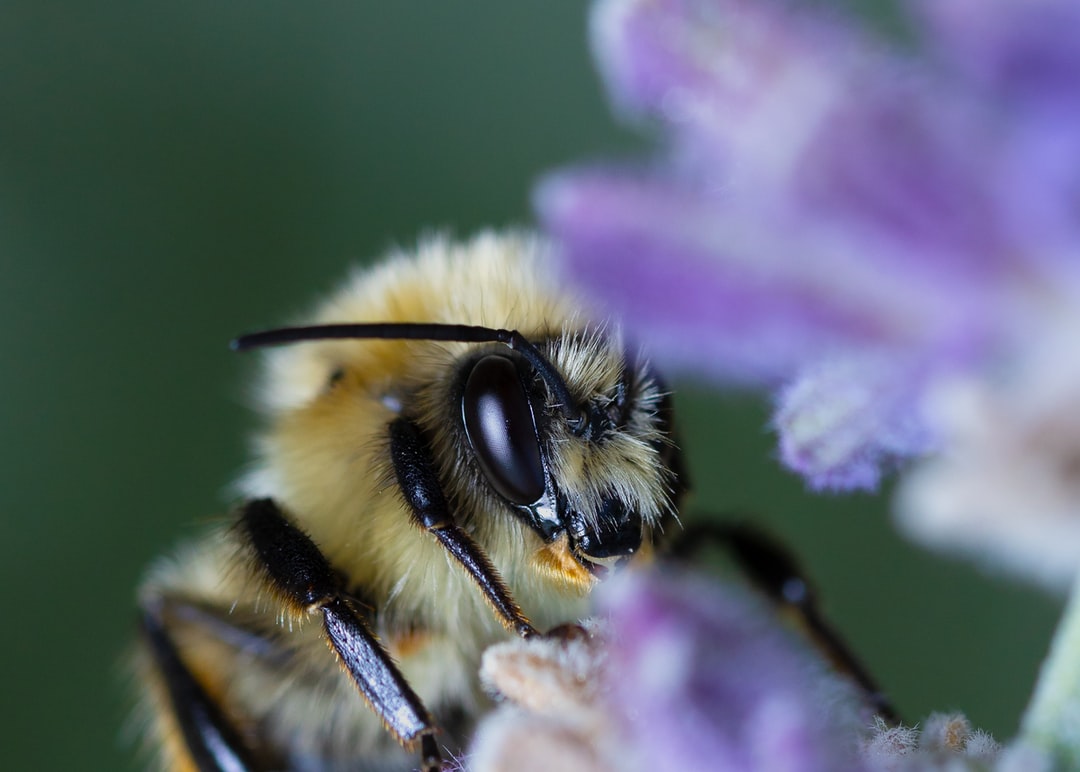
We give it a width of 100% and apply a square aspect.
img {
    width: 100%; /* Responsive size */
    aspect-ratio: 1 / 1; /* Square aspect */
}
And we finish by cropping with object-fit so that the image is not deformed.
img {
    width: 100%; /* Responsive size */
    aspect-ratio: 1 / 1; /* Square aspect */
    object-fit: cover; /* Crops the image so it doesn't appear deformed */
    object-position: center; /* Centers the image in the crop */
}
As an extra we could round it with border-radius.
img {
    width: 100%; /* Responsive size */
    aspect-ratio: 1 / 1; /* Square aspect */
    object-fit: cover; /* Crops the image so it doesn't appear deformed */
    object-position: center; /* Centers the image in the crop */
    border-radius: 50%; /* Rounds the image */
}
Our bee now has a perfect appearance for a social network or a good Curriculum Vitae.
Activity 1
Create a chat between 2 people with the appropriate HTML. Do you remember which tag is used to repeat the same structure?
At a minimum, include the following parts:
- Avatar: It must be round
- Name
- Creation date
- Message
Don't hesitate to add all the CSS you think is appropriate, such as font-size, color, and the like.
Activity 2
Design a web page that serves as your contact card. It must contain:
- An image that takes up the whole space of the viewport. Prevent it from becoming deformed.
- A list of links to your data: Curriculum Vitae, social networks, email, your other pages, etc.
- A logical content structure (
body>main>section>nav>ul>li>a)
Don't forget to use height: 100vh to take up the whole height of the viewport.
This work is under a Attribution-NonCommercial-NoDerivatives 4.0 International license.
:quality(85)/https://andros.dev/static/img/components/license/by-nc-nd.png)
Desafíos de programación atemporales y multiparadigmáticos
Te encuentras ante un librillo de actividades, divididas en 2 niveles de dificultad. Te enfrentarás a los casos más comunes que te puedes encontrar en pruebas técnicas o aprender conceptos elementales de programación.
Buy the book Sure, it's on me!
Comments
There are no comments yet.