
2. Format
All web pages are made up of text wrapped in different tags where each one holds a unique property that is transmitted to its content, usually text. All of them are interconnected through nesting (some inside others) or a certain order.
Anatomy
All of them have a structure similar to the following.
<tag>Content</tag>As you work with each tag you'll gradually assimilate and automate its use.
Before continuing, you must know how comments are added to the code and how they are seen only by you.
| Tag | <!-- Comment --> |
|---|---|
| Description | Texts that will be ignored by the browser, practical for leaving comments or notes by the Web Designer. |
| Attributes | Global |
| Type | Inline |
<!-- Block of text describing Frodo -->
Protagonist of the novel, son of Drogo Baggins and Primula Brandybuck. After the death of his parents, his uncle Bilbo adopted him and named him his heir, a fact that led him to possess the One Ring.Texts
Let's look at some essential tags for formatting our texts.
Paragraphs
| Tag | <p> |
|---|---|
| Description | Creates paragraphs. |
| Attributes | Global |
| Type | Block |
<p>Somewhere in La Mancha...</p>Somewhere in La Mancha...
Around the web you'll find that it's possible to use the align attribute to align text (center, left, justify or right). DO NOT USE IT! It's obsolete; nowadays CSS styles are used.
Highlight
Not to be confused with bold.
| Tag | <strong> |
|---|---|
| Description | Marks important texts or those of great relevance. |
| Attributes | Global |
| Type | Inline |
Take this medication and store it in a dark place. <strong>Not to be consumed by children under 6 years of age</strong>Emphasize
| Tag | <em> |
|---|---|
| Description | Gives emphasis to a word, only proper nouns or words in another language. |
| Attributes | Global |
| Type | Inline |
<em>Legolas</em>! What do your elf eyes see?Headings
| Tag | <h1>, <h2>, <h3>, <h4>, <h5>, <h6> |
|---|---|
| Description | Headers or headings. They are numbered from 1 to 6, from greatest to least importance. |
| Attributes | Global |
| Type | Block |
<h1>The Lord of the Rings</h1>
<h2>The Fellowship of the Ring</h2>
<p>Three Rings for the Elven-kings under the sky.
Seven for the Dwarf-lords in their halls of stone...</p>
The Lord of the Rings
The Fellowship of the Ring
Three Rings for the Elven-kings under the sky. Seven for the Dwarf-lords in their halls of stone...
Superscript
| Tag | <sup> |
|---|---|
| Description | At the typographic level, raises the character to a superscript. |
| Attributes | Global |
| Type | Inline |
8 = 2<sup>x</sup>Subscript
| Tag | <sub> |
|---|---|
| Description | At the typographic level, lowers the character to a subscript. |
| Attributes | Global |
| Type | Inline |
Without the molecule C<sub>8</sub>H<sub>10</sub>N<sub>4</sub>O<sub>2</sub>, also called caffeine, I couldn't go to class.Time
| Tag | <time> |
|---|---|
| Description | Marks a time. At the visual and interactive level it does not reflect any change, unless intentionally specified with styles. |
| Attributes | datetime: Date or time that will be interpreted by the browser. |
| Type | Inline |
Time of day
<time>22:03</time>Date
<time datetime="2022-10-12">Last time I went to the dentist</time>Date and time
<time datetime="2012-10-12T17:00:00">When I finished my degree.</time>Difference between block and inline tags
Block tags, like <p>, take up the full width of the row. One of their side effects is pushing the next tag to a new row. Whereas inline tags, for example <strong>, allow you to concatenate as many as necessary without altering the layout.
You must be aware of the nature of each tag to build your sites without difficulty.
With CSS it's possible to change it as needed.
Tags without a closing tag
| Tag | <br> |
|---|---|
| Description | Line break. It is not a substitute for paragraphs but for minor adjustments. |
| Attributes | Global |
| Type | Inline |
<p>Doctor Who premiered on BBC Television after discussions<br>and planning that had lasted a year.</p>Doctor Who premiered on BBC Television after discussions
and planning that had lasted a year.
Anatomy of an HTML5 document
Let's look at the minimal structure of any modern web page.
<!--Indicates that the document uses HTML5-->
<!doctype html>
<!--Lets the browser know that the page is in Spanish-->
<html lang="es">
    <head>
        <!--Allows unusual characters outside the American alphabet: ñ, á, é...-->
        <meta charset="utf-8"/>
        <!--Title that will appear in the tab - The structure will be the name of the current page + Description of the site-->
        <title>Document</title>
        <!--Resets the zoom-->
        <meta name="viewport" content="width=device-width, initial-scale=1.0, shrink-to-fit=no">
    </head>
    <body>
       All my content
    </body>
</html>
You can use it as a base to start any future activity or site. If you want a more complete version you can download the full template.
Whitespace
| Tag | |
|---|---|
| Description | Space. There are more flexible alternatives in CSS such as margin or word-spacing. |
| Attributes | None |
| Type | Inline |
Autumn is one of the four seasons of the year and one of the two of the intertropical zone.| Tag | <pre> |
|---|---|
| Description | The content respects line breaks and spaces. |
| Attributes | Global |
| Type | Block |
<pre>Pixar:
        - Toy Story.
        - Wall-E.
        - The Incredibles.
</pre>
Pixar:
- Toy Story.
- Wall-E.
- The Incredibles.
Entities (Special characters)
HTML entities are words that start with an ampersand (&) and end with a semicolon (;). They are advanced characters that may be part of the HTML syntax itself, which makes them impossible to represent, or that are outside our keyboard. The browser will take care of translating them as long as they are well written.
In the following table you can see some of them, although the extensive official list exists.
| Literal character | HTML equivalent |
|---|---|
| < | < |
| > | > |
| " | " |
| ' | ' |
| & | & |
| © | © |
| € | € |
| ❤ | ♥ |
Accents and the ñ also have their equivalent, although it's not necessary to use them thanks to the utf-8 meta.
Obsolete
Even though around the web you'll find examples where they're present, you must avoid them since they have been marked as old tags that are no longer part of the HTML standard.
| Tag | <b> |
|---|---|
| Description | OBSOLETE! Never use it. Gives a bold style to text. |
| Attributes | Global |
| Type | Inline |
Lost causes are the only ones <b>worth fighting for</b>.| Tag | <i> |
|---|---|
| Description | OBSOLETE! Never use it. Gives an italic style to text. |
| Attributes | Global |
| Type | Inline |
In <i>900 years of time and space</i>, I've never met anyone who wasn't important.Activity 1
Create the following page using paragraphs

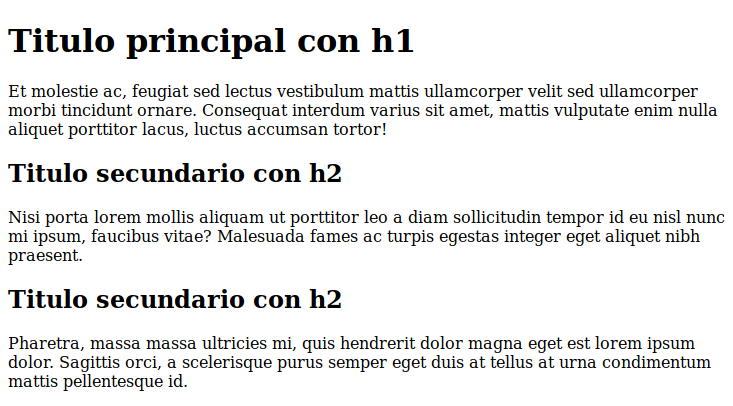
Activity 2
Create the following page.
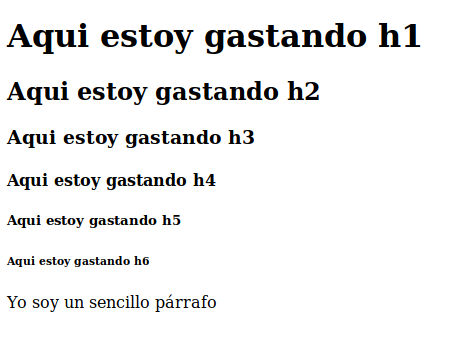
Activity 3
Create the following page.
Activity 4
Create the following page.

Activity 5
Create the following page.

Activity 6
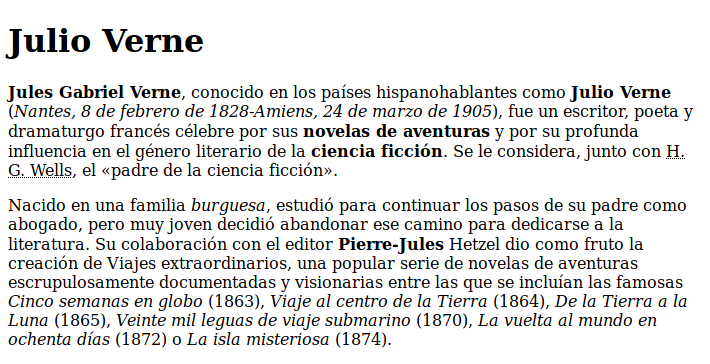
Use the following text:
Jules Verne

Jules Gabriel Verne, known in Spanish-speaking countries as Julio Verne (Nantes, 8 February 1828 - Amiens, 24 March 1905), was a French writer, poet and playwright famous for his adventure novels and for his profound influence on the literary genre of science fiction. He is considered, together with H. G. Wells, the "father of science fiction".

Born into a bourgeois family, he studied to follow in his father's footsteps as a lawyer, but very young he decided to abandon that path to dedicate himself to literature. His collaboration with the editor Pierre-Jules Hetzel resulted in the creation of Extraordinary Voyages, a popular series of scrupulously documented and visionary adventure novels which included the famous Five Weeks in a Balloon (1863), Journey to the Center of the Earth (1864), From the Earth to the Moon (1865), Twenty Thousand Leagues Under the Seas (1870), Around the World in Eighty Days (1872) or The Mysterious Island (1874).
To achieve the following goal
Activity 7
Build a web page where you describe your last vacation.
- Add headings.
- Mark text with bold.
- Mark text with italics.
- Use paragraphs.
- Be original.
:quality(85)/https://andros.dev/static/img/components/license/by-nc-nd.png)
This work is under a Attribution-NonCommercial-NoDerivatives 4.0 International license.

Building SPAs with Django and HTML Over the Wire: Learn to build real-time single page applications with Python
The HTML over WebSockets approach simplifies single-page application (SPA) development and lets you bypass learning a JavaScript rendering framework such as React, Vue, or Angular, moving the logic to Python. This web application development book provides you with all the Django tools you need to simplify your developments with real-time results.
Buy the bookHelp me keep writing
Every coffee gives me a push toward the next article.
 Sure, it's on me!
Comments
There are no comments yet.