
13. WebSockets
Unlike Fetch data or AJAX, the WebSocket API is an advanced technology that lets us do bidirectional communication between a client and a server. The server can send messages to the client and the client to the server through the same channel.
:quality(85)/https://andros.dev/static/img/courses/js/13/ajax-vs-websockets.jpg)
This technology is essential for tasks like:
- Real time applications, such as a chat or a social network.
- Sending messages to a specific client, such as notifications.
- Sending mass messages, such as a multiplayer video game.
- Collaboration applications, such as Google Drive or Notion.
Server
To illustrate WebSocket's features without relying on complex or paid services, we'll create a small server. This lesson doesn't aim to teach backend development with JavaScript or dive deep into Node, but rather to offer a basic tool for learning WebSockets.
We'll create a server that sends back any information sent to it to all connected clients (Broadcast).
:quality(85)/https://andros.dev/static/img/courses/js/13/broadcast.jpg)
First, let's make sure we have Node.js (the binary for running JavaScript) and npm (the JavaScript package manager) installed on our machine.
node --versionnpm --versionIn both cases it will show the installed version. Otherwise it will show an error that we'll need to fix before continuing.
Now we'll install the WebSockets libraries.
We'll place ourselves in a new folder, so as not to mix it with other work, and run.
npm install wsWe create a file called index.js, in the folder we're in, and paste the following code.
// Imports
const WebSocket = require("ws");
const http = require("http");

// We create an instance of the HTTP (Web) server
const server = http.createServer();
// We create and start a WebSocket server from the HTTP server
const wss = new WebSocket.Server({ server });

// We listen for connection events
wss.on("connection", function connection(ws) {
    // We listen for incoming messages
    ws.on("message", function incoming(data) {
        // We iterate over all connected clients
        wss.clients.forEach(function each(client) {
            if (client.readyState === WebSocket.OPEN) {
                // We send the received information
                client.send(data.toString());
            }
        });
    });
});

// We start the HTTP server
server.listen(8080);
console.log("Server running. Use ws://localhost:8080 to connect.")
We save.
Now we'll start the server.
node index.jsDone! To connect with the client we'll use ws://localhost:8080. We'll leave it running and move on to creating a client.
Client
Connecting
:quality(85)/https://andros.dev/static/img/courses/js/13/connect.jpg)
Natively we have an API for handling these interactions. We'll need to use the WebSocket object and store it in a variable to use its events or features.
const myWebSocket = new WebSocket(url [, protocols]);It can be used by including the protocol along with the full path.
const myWebSocket = new WebSocket("ws://myserver.com");Or by separating the protocols to use as a second argument.
const myWebSocket = new WebSocket("myserver.com", ["ws", "wss"]);Just like there's a difference between http and https, the latter being secure, we'll also find this in the WebSocket protocol.
- ws: WebSockets.
- wss: Secure WebSockets.
const myWebSocket = new WebSocket("ws://myserver.com");Being more secure.
const myWebSocket = new WebSocket("wss://myserver.com");We also have an event that fires when connecting.
const myWebSocket = new WebSocket("wss://myserver.com");

function open () {
    // Connection opens
    console.log("WebSocket open.");
}

myWebSocket.addEventListener("open", open);
Messages
:quality(85)/https://andros.dev/static/img/courses/js/13/message.jpg)
Listening
If we want to collect messages sent by the server, or by other clients, we need to watch for the message event.
const myWebSocket = new WebSocket("wss://myserver.com");

function message (event) {
    // A message is received
    console.log("WebSocket has received a message");
    // Show message in HTML
    myResponses.innerHTML = myResponses.innerHTML.concat(event.data, "<br>");
}

myWebSocket.addEventListener("message", message);
Sending
To send messages to the server we have the send() function.
const myWebSocket = new WebSocket("wss://myserver.com");

myWebSocket.send("My message");
Error handling
Things won't always go as expected, there can be connection drops due to network outages or server issues.
:quality(85)/https://andros.dev/static/img/courses/js/13/error.jpg)
For that, we'll watch the error event.
const myWebSocket = new WebSocket("wss://myserver.com");

function error (event) {
    // An error has occurred
    console.error("WebSocket observed an error: ", event);
}

myWebSocket.addEventListener("error", error);
Disconnecting
For the case where the client disconnects or the connection breaks, possibly due to a major failure, we'll catch the close event.
:quality(85)/https://andros.dev/static/img/courses/js/13/disconnect.jpg)
const myWebSocket = new WebSocket("wss://myserver.com");

function close () {
    // Connection closes
    console.log("WebSocket closed.");
}

myWebSocket.addEventListener("close", close);
Example
With everything we've learned, we'll connect to the server to send or receive messages.
Create a file called client-ws.html with the following content.
<!doctype html>
<html lang="es">
  <head>
    <meta charset="UTF-8"/>
    <title>WebSocket client example</title>
  </head>
  <body>

    <!-- New message -->
    <input type="text" id="nuevo-mensaje">

    <!-- Received messages -->
    <div id="respuestas"></div>

    <script>
      // Variables
      const miWebSocket = new WebSocket("ws://localhost:8080");
      const miNuevoMensaje = document.querySelector("#nuevo-mensaje");
      const misRespuestas = document.querySelector("#respuestas");

      // Functions
      function open () {
          // Connection opens
          console.log("WebSocket open.");
      }

      async function message (evento) {
          // A message is received
          console.log("WebSocket has received a message");
          // Show message in HTML
          const mensajeRecibido = await evento.data.text(); // Fix for Node since it returns a Blob. With just "evento.data" it should be enough
          misRespuestas.innerHTML = misRespuestas.innerHTML.concat(mensajeRecibido, "<br>");
      }

      function error (evento) {
          // An error has occurred
          console.error("WebSocket observed an error: ", evento);
      }

      function close () {
          // Connection closes
          console.log("WebSocket closed.");
      }

      function enviarNuevoMensaje (evento) {
          // Enter key event
          if(evento.code === "Enter") {
              // Send message via WebSockets
              miWebSocket.send(miNuevoMensaje.value);
              // Clear input text
              miNuevoMensaje.value = "";
          }
      }

      // WebSocket events
      miWebSocket.addEventListener("open", open);
      miWebSocket.addEventListener("message", message);
      miWebSocket.addEventListener("error", error);
      miWebSocket.addEventListener("close", close);

      // Event to send a new message
      miNuevoMensaje.addEventListener("keypress", enviarNuevoMensaje);

    </script>
  </body>
</html>
Open the file in several windows at the same time to see how it works.
Activity 1
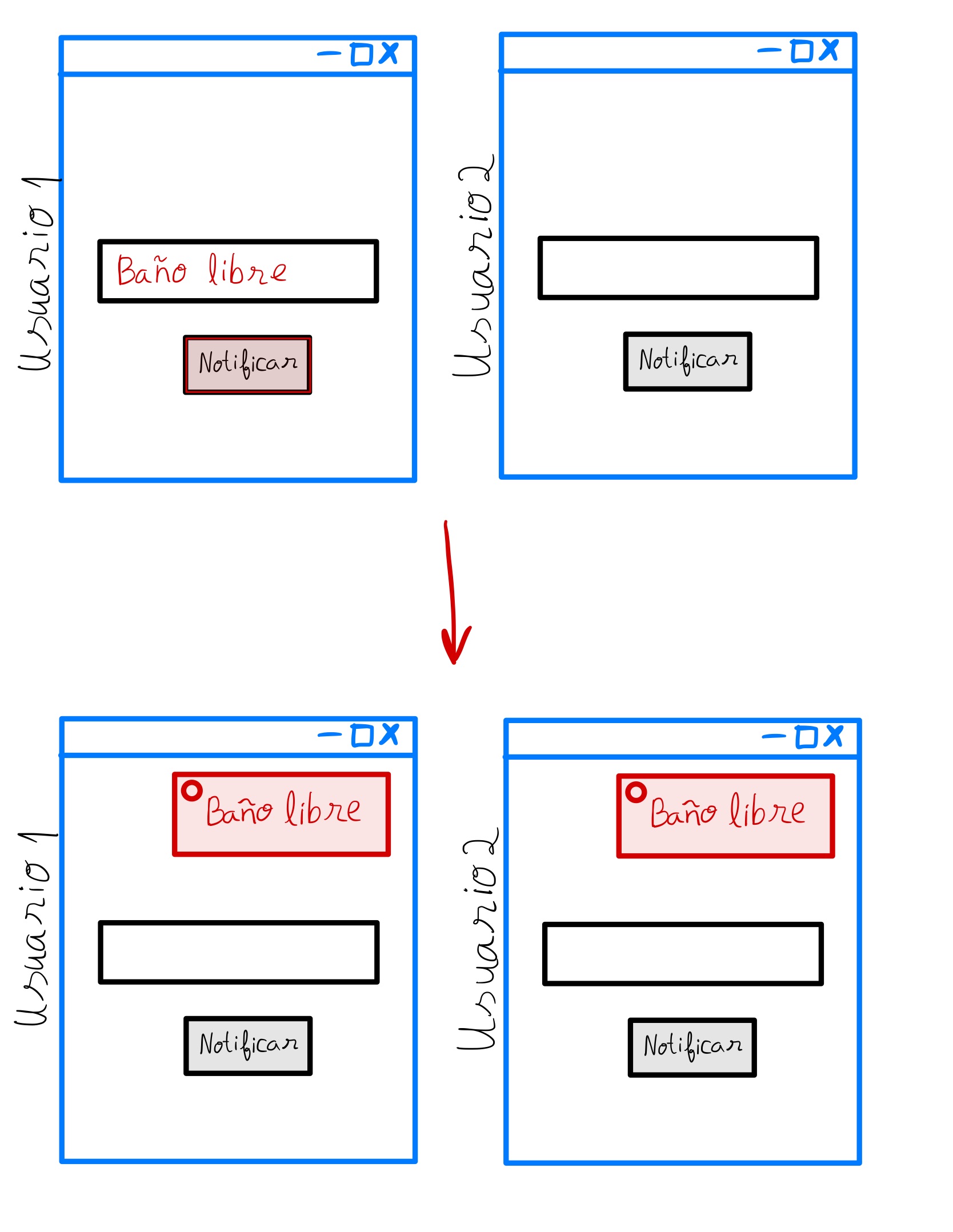
Create a text input to send notifications to everyone who's connected. Use the example server from the lesson.
Nightmare level 👹
Add an alert sound when you receive a new message.
Activity 2
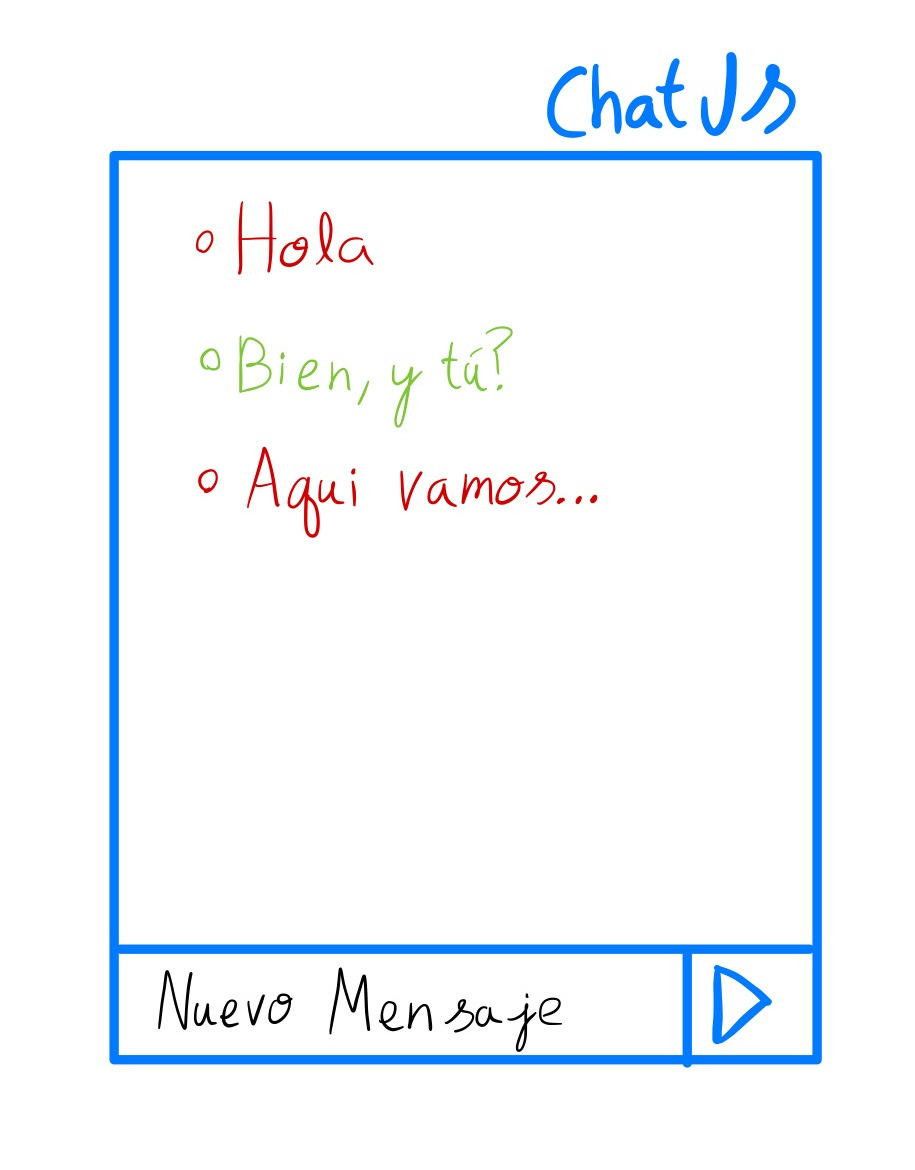
Build a simple, lightweight chat. Use the example server from the lesson.
Nightmare level 👹
Unfortunately, messages are lost when we refresh the page. Fix the problem by storing each message in Localstorage and retrieving them all when you enter.
Activity 3
Program a tic-tac-toe game to play with a friend remotely. Use the example server from the lesson.
:quality(85)/https://andros.dev/static/img/components/license/by-nc-nd.png)
This work is under a Attribution-NonCommercial-NoDerivatives 4.0 International license.

Building SPAs with Django and HTML Over the Wire: Learn to build real-time single page applications with Python
The HTML over WebSockets approach simplifies single-page application (SPA) development and lets you bypass learning a JavaScript rendering framework such as React, Vue, or Angular, moving the logic to Python. This web application development book provides you with all the Django tools you need to simplify your developments with real-time results.
Buy the bookHelp me keep writing
Every coffee gives me a push toward the next article.
 Sure, it's on me!
Comments
There are no comments yet.