

1. Introduction
A database is used to store information persistently. All the data must be grouped and ordered so that it is easy to use or search.
Everything is grouped into tables, and each table has its own columns. To make it easier for you, imagine an Excel spreadsheet: we would call the file Products, and inside it we would have columns with the headings: name, price and units.
:quality(85)/https://andros.dev/static/img/courses/sql/excel.jpg)
In a database the file would be the table, and each heading a column.
If we want to run complex queries (products that have more than 5 units and a price below 2.3 euros), insert lots of data, update fields or delete rows, it will take a lot of free time. We have another option: a language capable of meeting all the above requirements without breaking a sweat. That is called SQL.
The SQL (Structured Query Language) syntax has been programmed and designed to manage relational databases, the most common ones today and heavily used in Web ecosystems. We will explain the concept later.
Among the most famous relational databases we find:
- PostgreSQL
- MySQL/MariaDB
- Oracle
- SQLite
During the course we are going to work with the basic commands so that you can manage a database, but do not limit yourself to the course because you can go as deep as you want. To give you an idea: there are SQL professions. People whose daily job consists of optimizing and maintaining a database. Can you imagine how many kilometers deep this goes? Don't be scared! In your case it is not necessary to dive that far. Here we will learn the basics, enough to swim comfortably.
I also want you to be aware that there are 2 types of languages.
- DDL (Data Definition Language): Used to define databases, tables, indexes, views, etc.
- DML (Data Manipulation Language): Manage the information, such as querying it, creating new data, deleting or updating.
In this course we will focus on DML.
SQLite
Before we get into the nitty-gritty of SQL, we are going to look at a small tutorial for working with SQLite. A simple database that is widely used in applications. It is, without a doubt, the most popular database in the world of programming. Besides being very lightweight and easy to use, it is perfect for learning SQL.
First we will download and install SQLite Browser.
If you feel more comfortable, you can work from the command line. Download the version you need from the official SQLite page.
Once we open it, we will find a simple interface.
:quality(85)/https://andros.dev/static/img/courses/sql/1.jpg)
In this course we will use an already prepared database that simulates a record label. Now download the Chinook file. You can also see the database relationship schema. Once you have it, click Open Database and look for the file.
:quality(85)/https://andros.dev/static/img/courses/sql/2.jpg)
At the bottom, all the tables will be shown.
:quality(85)/https://andros.dev/static/img/courses/sql/3.jpg)
To be able to enter commands in the SQL language, we will go to the Execute SQL tab. It will be the space where we will always work.
:quality(85)/https://andros.dev/static/img/courses/sql/4.jpg)
It is time to run our first query, how exciting!
Inside the left box, write the following instruction.
SELECT Title FROM Album;In SQL it does not matter whether you use uppercase or lowercase. It will treat you the same either way.
:quality(85)/https://andros.dev/static/img/courses/sql/5.jpg)
To run the statement we click the Play icon.
All the titles of the Albums will be shown (Select title from Album). As you can see, it is quite natural to write.
:quality(85)/https://andros.dev/static/img/courses/sql/6.jpg)
If you want to see the rest of the tables or columns, you can explore the Database Structure tab.
:quality(85)/https://andros.dev/static/img/courses/sql/7.jpg)
You are now ready to learn SQL. Let's start by understanding what you wrote.
Data types in SQLite
SQLite uses a dynamic type system, but it recognizes the following storage types:
- NULL: Null value.
- INTEGER: Whole number (it can store 1, 2, 3, 4, 6 or 8 byte values depending on the magnitude).
- REAL: Floating-point number (decimals).
- TEXT: Text string (stored using UTF-8, UTF-16BE or UTF-16LE encoding).
- BLOB: Binary data (Binary Large Object), stored exactly as it was entered. Useful for images, files, etc.
Unlike other databases, SQLite is flexible with types. For example, you can insert text into a column declared as INTEGER. However, it is good practice to respect the declared types to keep the data consistent.
:quality(85)/https://andros.dev/static/img/components/license/by-nc-nd.png)
This work is under a Attribution-NonCommercial-NoDerivatives 4.0 International license.

Building SPAs with Django and HTML Over the Wire: Learn to build real-time single page applications with Python
The HTML over WebSockets approach simplifies single-page application (SPA) development and lets you bypass learning a JavaScript rendering framework such as React, Vue, or Angular, moving the logic to Python. This web application development book provides you with all the Django tools you need to simplify your developments with real-time results.
Buy the bookHelp me keep writing
Every coffee gives me a push toward the next article.
 Sure, it's on me!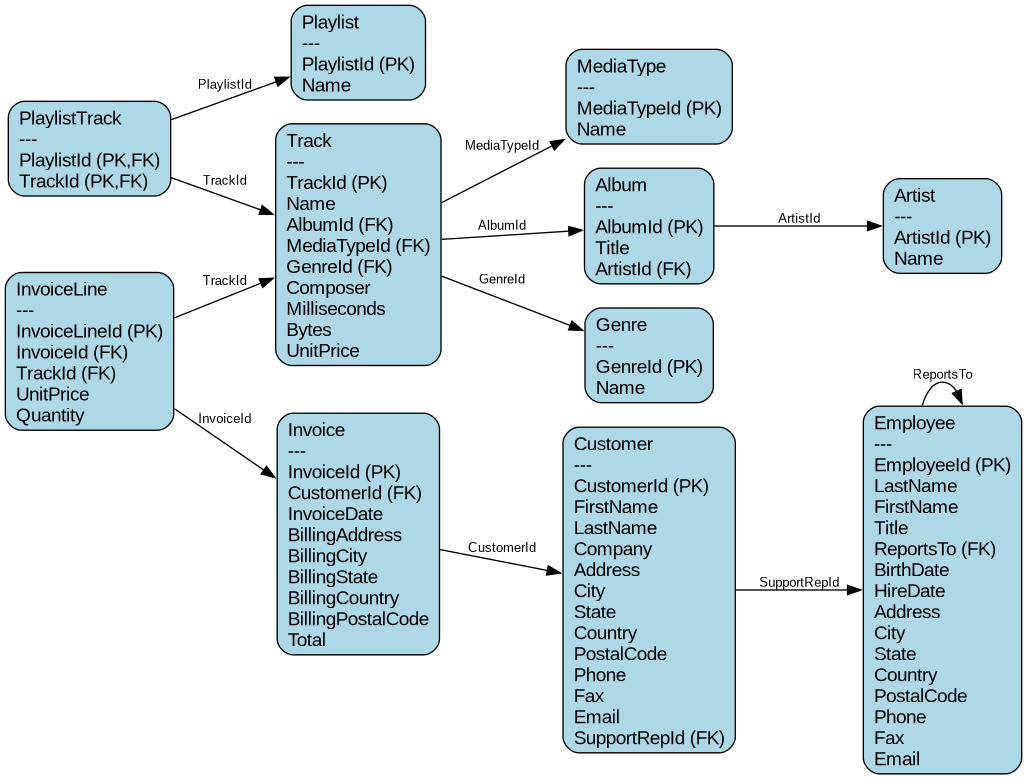
Comments
There are no comments yet.